
Devices
Device Detail
Explore all the tabs and features available on the device detail page
The device detail page provides comprehensive management through multiple tabs.
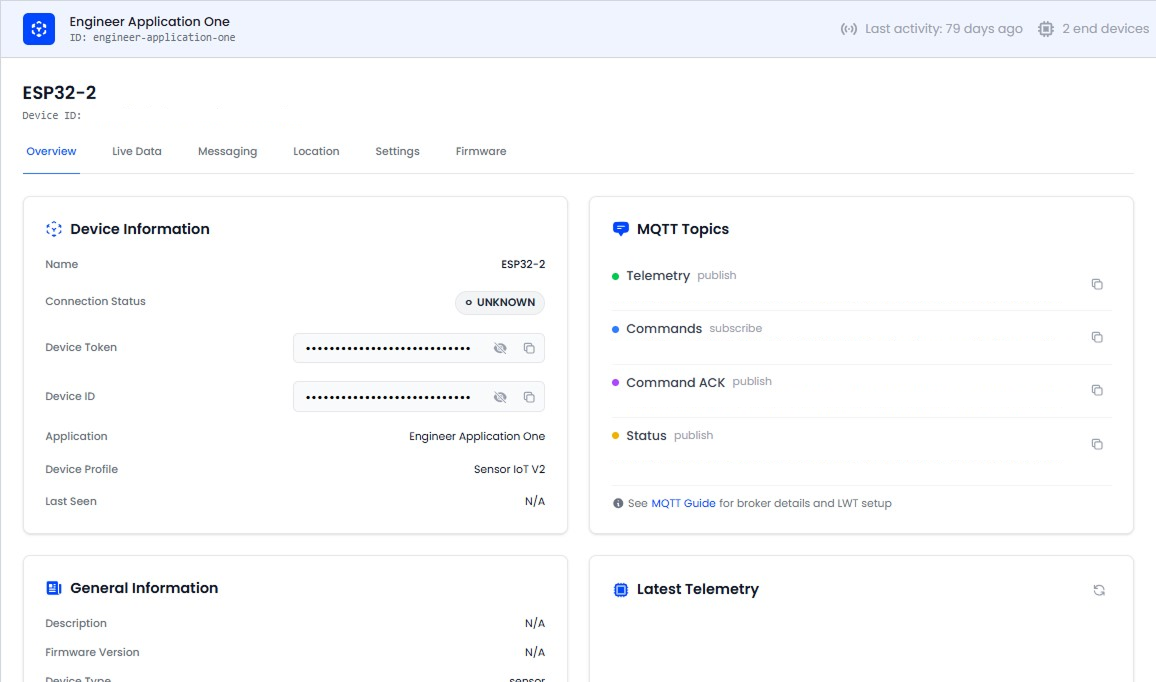
Overview Tab
The default view shows:
- Device Information - Name, status, token, ID, application, and profile
- MQTT Topics - Telemetry, commands, ACK, and status topics with copy buttons
- General Information - Description, firmware version, device type, creation date
- Latest Telemetry - Key-value list of the most recent readings, with a raw JSON toggle
- Location Map - If GPS coordinates are configured, an interactive map is displayed
Live Data Tab
A real-time message stream for this specific device. Decoded telemetry appears as messages arrive via WebSocket.
Location Tab
Set or update the device's GPS coordinates:
- Click on the interactive map to set a location
- Or enter latitude and longitude manually
- Click Save to persist the location to device metadata
Messaging (Commands) Tab
Send commands to the device and track their lifecycle:
- Enter a command name and optional JSON parameters
- View command history with status tracking
- Expand rows to see parameters, response payload, and errors
- Command lifecycle: PENDING → SENT → ACKNOWLEDGED / FAILED / TIMEOUT
Firmware Tab
View firmware information and OTA update history for this device:
- Current firmware version
- OTA update history with campaign name, firmware version changes, status, and timestamps
Payload Formatter Tab
Override the device profile's payload decoder at the device level:
- JavaScript code editor for custom transformation logic
- Test the decoder with sample payloads before saving
Settings Tab
- Edit device name, firmware version, and description
- Device Mobility: Configure whether the device is stationary or mobile (affects location tracking behavior)
- MQTT Credentials: View/copy device token, regenerate token, generate new password
- Danger Zone: Delete the device permanently
Deleting a device removes all associated telemetry data, command history, and alarm instances. This action cannot be undone.