
MQTT Overview
How devices connect to Sensorclouds over MQTT, and what you need before you start
Devices talk to Sensorclouds over MQTT, a lightweight publish/subscribe protocol built for small devices and unreliable networks. Almost every IoT platform, module, and language has an MQTT client, so you don't need an SDK from us.
Connection details
| Setting | Value |
|---|---|
| Broker host | mqtt.sensorclouds.app |
| Port (recommended) | 8883, MQTT over TLS (MQTTS) |
| Port (testing only) | 1883, plain MQTT without encryption |
| Username | The device's Device Token |
| Password | The device's generated MQTT password |
| Client ID | The Device Token |
| MQTT version | 3.1.1 |
Port 1883 sends your device's password unencrypted. Use it only on a test bench, never for devices in the field.
How it works
Register the device and generate its MQTT password.
The device connects to the broker with its token and password.
The broker checks the credentials with Sensorclouds.
The device publishes readings to its /data topic and subscribes to its /cmd topic.
Each device is restricted to its own topics, and can't read or write another device's.
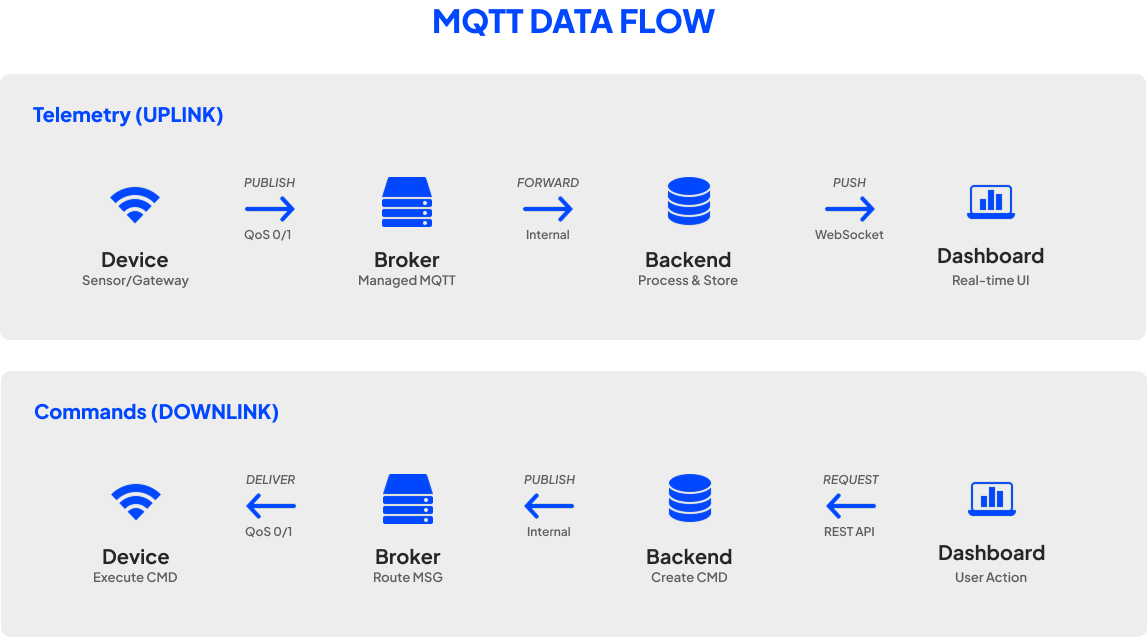
The four topics every device uses
| Topic | Direction | Purpose |
|---|---|---|
…/data | Device → platform | Telemetry readings |
…/status | Device → platform | Online/offline (Last Will) |
…/cmd | Platform → device | Commands, including firmware updates |
…/ack | Device → platform | Command acknowledgments and OTA progress |
Every topic starts with tenant/{tenantId}/app/{applicationId}/device/{deviceToken}/. See
MQTT Topics.