
What is Sensorclouds?
An introduction to the Sensorclouds IoT platform and what it can do for you
Sensorclouds is an IoT platform for connecting devices, collecting their data, and acting on it. Your devices send readings over MQTT. Sensorclouds stores them, shows them on live dashboards, raises alarms when values cross your limits, sends commands back to devices, and updates their firmware over the air.
It's multi-tenant: each organization works in its own isolated workspace, and one person can belong to several workspaces with a different role in each.
How it works
 Devices ──MQTT──▶ Sensorclouds ──▶ Dashboards, alarms, notifications
    ▲                   │
    └─── commands ◀─────┤──▶ Integrations (Slack, Telegram, webhooks)
         & firmware      └──▶ REST API for your own systems
A device publishes a message to its own MQTT topic, using credentials that belong to that device only.
Sensorclouds decodes it with the device profile's decoder, turning raw bytes or JSON into
named fields such as temperature.
The readings are stored as time-series data, and new fields are discovered automatically.
Everything reacts at once. Dashboards update, alarm rules are checked, and notifications and integrations fire.
You act. Toggle a relay from a dashboard, send a command, or roll out new firmware, and the device receives it on its command topic.
Key capabilities
Connectivity and data
| Capability | What you get |
|---|---|
| MQTT connectivity | Standard MQTT with TLS, so any MQTT-capable device or library works |
| Per-device security | Every device has its own credentials and can reach only its own topics |
| Payload decoders | JavaScript decoders turn binary or custom formats into fields |
| Time-series storage | Readings kept for your plan's retention window |
| Status tracking | Online/offline detection from connection events and message activity |
Monitoring and control
| Capability | What you get |
|---|---|
| Live dashboards | Nine widget types, a positional layout, and real-time mode |
| Rule-based alarms | Thresholds with duration and cooldown, plus severities |
| Commands | Send instructions to devices and track their acknowledgment |
| OTA updates | Batched firmware campaigns with per-device progress |
Teams and integration
| Capability | What you get |
|---|---|
| Workspaces and roles | Admin, Engineer, and Crew per workspace, with strict data isolation |
| Invitations | Add people by email, and they keep one account across workspaces |
| Integrations | Push events to Slack, Telegram, or any HTTPS endpoint |
| Scheduled reports | Telemetry digests delivered to Telegram |
| REST API | Read-only API with scoped, rotatable API keys |
Who it's for
| You are… | Sensorclouds helps you… |
|---|---|
| An IoT solution provider | Run many customer deployments, each isolated in its own workspace |
| A systems integrator | Build and hand over monitoring for clients, then support them from one account |
| An enterprise operations team | Monitor equipment across sites from one place, with alerts to the right people |
| A product or firmware team | Get a ready-made device backend: credentials, data storage, commands, and OTA |
Platform architecture
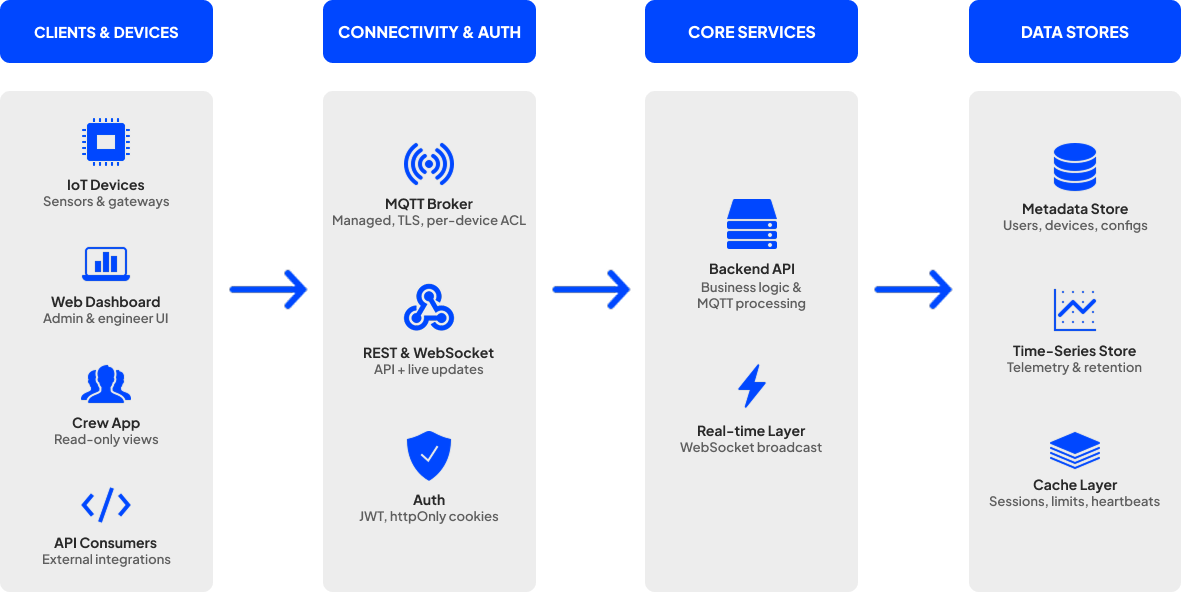
What each part does
| Part | Role |
|---|---|
| MQTT broker | Accepts device connections, checks each device's credentials, and keeps every device to its own topics |
| Processing | Decodes messages, applies timestamps, detects new fields, and updates device status |
| Telemetry store | Keeps time-series readings for dashboards, exports, and the API |
| Rules and events | Evaluates alarm rules and sends notifications and integration events |
| Live connection | Pushes new data and events to open browsers instantly |
| Web app and API | The Sensorclouds console you use, plus the REST API for your systems |