
Command Lifecycle
Command statuses, the message your device receives, and how to acknowledge it
Statuses
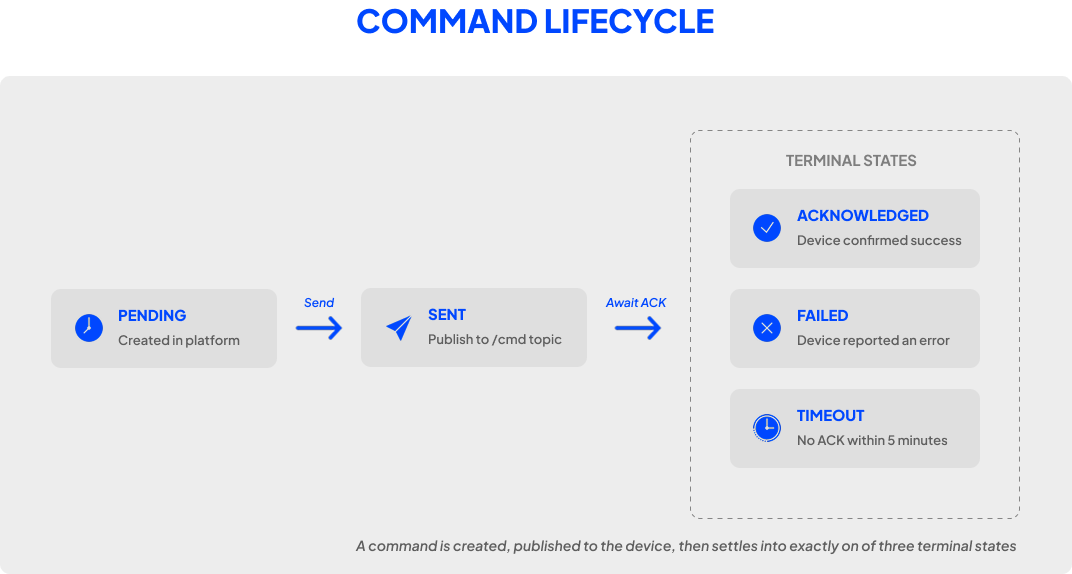
PENDING ──▶ SENT ──▶ ACKNOWLEDGED
                 ├──▶ FAILED
└──▶ TIMEOUT (no reply within 5 minutes)| Status | Meaning |
|---|---|
| PENDING | Created, not yet delivered to the broker |
| SENT | Published to the device's /cmd topic |
| ACKNOWLEDGED | The device replied with success |
| FAILED | The device replied with an error, or couldn't be reached |
| TIMEOUT | No reply within 5 minutes |
What the device receives
On tenant/{tenantId}/app/{applicationId}/device/{deviceToken}/cmd:
{
  "commandId": "6f1c2e9a-3b4d-4e5f-8a9b-0c1d2e3f4a5b",
  "command": "reboot",
  "parameters": { "delay": 5 },
  "timestamp": "2026-09-18T07:30:00.000Z"
}
How the device acknowledges
Publish to tenant/{tenantId}/app/{applicationId}/device/{deviceToken}/ack:
Success
{ "commandId": "6f1c2e9a-3b4d-4e5f-8a9b-0c1d2e3f4a5b", "status": "ok", "message": "Rebooting in 5 s" }Failure
{ "commandId": "6f1c2e9a-3b4d-4e5f-8a9b-0c1d2e3f4a5b", "status": "error", "error": "Unknown command" }| Rule | Detail |
|---|---|
Echo commandId exactly | Without it, the ACK is ignored |
| Success value | "status": "ok", or "success": true |
| Anything else | Recorded as FAILED |
message / error | Shown in the command history |
| Extra keys | Kept with the response, which is useful for returning values |
"status": "success" is treated as a failure. Use "ok".
Example: returning data
A status command can return values in the acknowledgment:
{ "commandId": "…", "status": "ok", "battery": 3.92, "rssi": -67, "uptime": 86400 }The whole response is visible when you expand the command in the history.
Acknowledge after carrying out the command, but before a reboot or anything else that drops the connection.
Command history
The Command History table on the Messaging tab lists the commands sent to the device: Command, Status, Sent At, Acknowledged At, and a Response summary (Success, Failed, or Timeout).
Click a row to expand it:
| Detail | Description |
|---|---|
| Parameters Sent | What was sent |
| Device Response | The device's full acknowledgment |
| Error Message | The failure reason, if any |
| Command ID | For matching with device logs |
Clear View empties the table on your screen only. The history itself isn't deleted.
On dashboards, the Command history button shows recent toggle commands.
Completed commands are kept for 7 days.
Troubleshooting
| Symptom | Cause | Fix |
|---|---|---|
| TIMEOUT | No ACK arrived within 5 minutes | Check that the device subscribes to /cmd, publishes to /ack, and echoes the commandId exactly |
| FAILED with no error message | The ACK had neither "status": "ok" nor "success": true | Fix the success value in the firmware |
| The ACK seems ignored | The commandId is missing or changed, or the ACK went to another device's topic | Echo the commandId unchanged, on this device's own /ack topic |
| The device acts on the same command twice | QoS 1 can deliver a message more than once | Remember the last commandId and skip repeats |