
MQTT Topics
Complete reference for device topics, message formats, and permissions
Topic structure
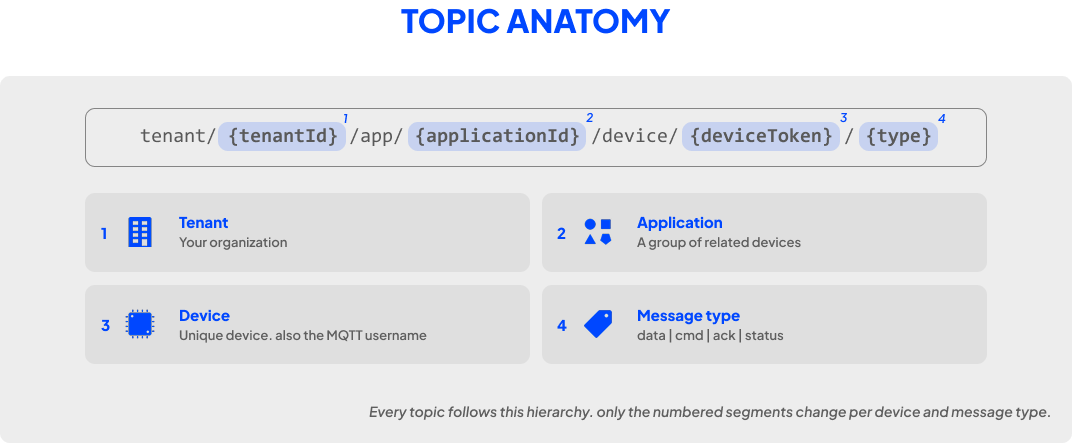
Every device topic follows one pattern:
tenant/{tenantId}/app/{applicationId}/device/{deviceToken}/{type}| Segment | Value | Where to find it |
|---|---|---|
{tenantId} | Your workspace's ID | Device → Overview → MQTT Topics |
{applicationId} | The application's Application ID | Under the application's name in the Applications list, or in the device's topics |
{deviceToken} | The device's token, for example dev_9f2c41a7… | Device → Settings |
{type} | data, status, cmd, or ack | Labelled Telemetry, Status, Commands, and Command ACK on the device's Overview tab |
Don't assemble topics by hand. Copy them from the device's Overview tab.
Permissions
| Topic | Device may |
|---|---|
…/data | Publish |
…/status | Publish |
…/ack | Publish |
…/cmd | Subscribe |
A device can't publish or subscribe to any other topic, including other devices' topics. Wildcard subscriptions aren't allowed.
/data: telemetry
Direction: device → platform · QoS: 1 recommended
| Format | Example | Decoded by |
|---|---|---|
| JSON | {"temperature": 21.5, "battery": 3.7} | The JSON decoder |
| Binary | Raw bytes | Your decoder |
| Hex string | 0x09D53C | Converted to bytes, then your decoder |
Optional keys in the decoded result: timestamp (the reading time) and backfill: true
(buffered data). See Sending Telemetry Data.
Maximum message size: 256 KB.
/status: online / offline
Direction: device → platform · QoS: 1 · Retain: true
{"status": "online"}{"status": "offline"}Publish online after connecting, and register offline as the Last Will.
/cmd: commands
Direction: platform → device · Subscribe with: QoS 1
{
  "commandId": "6f1c2e9a-3b4d-4e5f-8a9b-0c1d2e3f4a5b",
  "command": "setInterval",
  "parameters": { "seconds": 30 },
  "timestamp": "2026-09-18T07:30:00.000Z"
}| Key | Meaning |
|---|---|
commandId | Unique ID. Send it back in the acknowledgment |
command | The command name. ota:update and ota:rollback are reserved for firmware updates |
parameters | A JSON object (may be empty) |
timestamp | When the platform sent it |
/ack: acknowledgments
Direction: device → platform · QoS: 1
{
  "commandId": "6f1c2e9a-3b4d-4e5f-8a9b-0c1d2e3f4a5b",
  "status": "ok",
  "message": "Interval set to 30 s"
}| Key | Meaning |
|---|---|
commandId | (required) The ID from the command |
status | "ok" for success. Any other value marks the command FAILED |
success | Alternative to status: true for success |
message / error | Optional text shown in the command history |
Use exactly "status": "ok" (or "success": true). Values like "success" or
"done" are treated as failure.
For firmware updates, the ACK format is different. See Device OTA Protocol.