
Creating OTA Campaigns
Choose firmware, target devices, and a rollout strategy
Before you begin
- The firmware is PUBLISHED. See Firmware Management.
- The target devices run firmware that implements the Device OTA Protocol.
- You've tested the firmware on at least one device.
Steps
Open OTA Campaigns and click Create Campaign.
Fill in the form:
Basics
| Setting | Description |
|---|---|
| Name | For example "Firmware v2.1.0 Rollout". Up to 100 characters |
| Description | Optional. Why you're running it |
| Firmware | A PUBLISHED version |
Device Targeting
| Setting | Description |
|---|---|
| Application | Limit the campaign to one application, or leave it on All |
| Specific Devices (Optional) | Tick individual devices (or Select All). Leave all unticked to target every device that matches the application above |
Rollout Strategy
| Setting | Description | Range |
|---|---|---|
| All at Once or Batched | Update every target together, or a few at a time | - |
| Batch Size | Devices per batch (Batched) | 1–1000 |
| Batch Interval (min) | Minutes between batches (Batched) | 1–1440 |
Advanced Options
| Setting | Description | Range |
|---|---|---|
| Timeout (minutes) | How long to wait for a device before marking it failed | 5–1440 |
| Max Retries | Retry attempts per failed device | 0–10 |
| Only target devices that are currently online | Offline devices are skipped (marked SKIPPED). On by default | On/Off |
Click Create Campaign. The campaign is saved as CREATED. Nothing is sent yet.
Open the campaign, check the targets, and click Start.
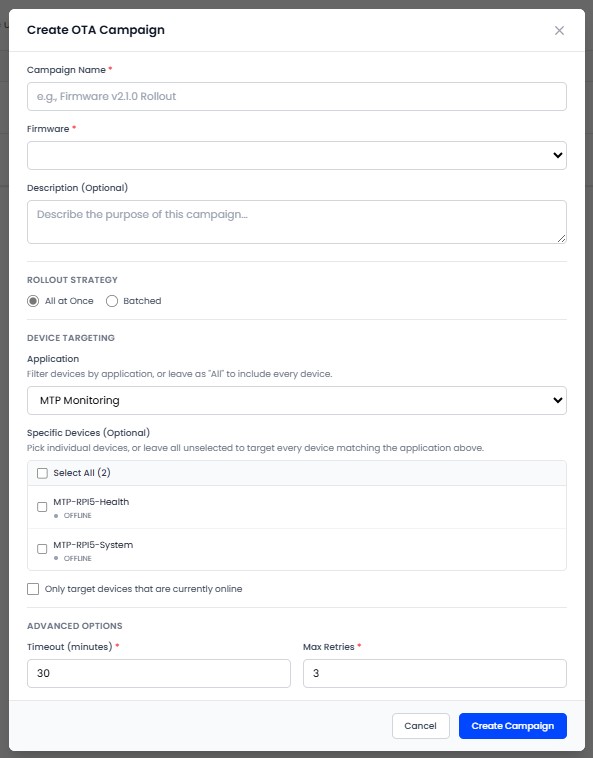
With Application on All and no devices ticked, the campaign targets every device in the workspace (or every device in your applications, for Engineers). Sensorclouds doesn't check that the firmware suits each device's hardware. Always narrow the targets to the devices the build is for.
Choosing a strategy
| Fleet | Strategy | Example settings |
|---|---|---|
| First rollout of new firmware | Batched | Batch 5, interval 30 min |
| Proven firmware, large fleet | Batched | Batch 50, interval 10 min |
| A few devices on a bench | All at Once | - |
The platform auto-pauses a campaign when more than 30% of devices fail. Investigate, then click Start to continue.
Campaign statuses
| Status | Meaning |
|---|---|
| CREATED | Configured, not started |
| IN_PROGRESS | Updating devices |
| PAUSED | Stopped for now. Click Start to continue |
| COMPLETED | Every target has finished, and at least one device updated successfully |
| FAILED | Every target has finished, and no device updated successfully. Use Retry Failed to try again |
| CANCELLED | Stopped for good |
Campaign actions
The buttons appear on the campaign's detail page when they apply:
| Action | Shown when | Effect |
|---|---|---|
| Start | CREATED or PAUSED | Begin the rollout, or continue a paused one |
| Pause | IN_PROGRESS | Hold the rollout. Updates already running on devices continue |
| Cancel | CREATED, IN_PROGRESS, or PAUSED | Asks you to confirm, then stops all pending updates. Devices not yet updated stay on their current firmware |
| Retry Failed | Any device has failed | Send the update again to the failed devices only |
Troubleshooting
| Message or symptom | Cause | Fix |
|---|---|---|
| Firmware not found or not published | The firmware is DRAFT or DEPRECATED | Publish it on the Firmware page |
| No devices match the target filter | No devices fit the application, device, and online settings | Check the targets, or turn off Only target devices that are currently online |
| N device(s) already have active OTA updates | Some targets are already in another running campaign | Wait for that campaign to finish, or cancel it |
| No failed devices to retry | Nothing has failed | Nothing to do |
| The campaign paused by itself | More than 30% of target devices failed | Open the campaign, read the device errors, fix the cause, then click Start to continue |
| Many devices are SKIPPED | They were offline when their batch started | Bring them online and run a new campaign for them |
| Devices stay in NOTIFIED until they time out | The firmware doesn't implement the OTA protocol | See Device OTA Protocol |