
CSV Export
Export telemetry from a Timeseries Table widget as a CSV file
The Timeseries Table widget can export telemetry as a CSV file for spreadsheets, reports, or offline analysis.
Before you begin
- CSV export must be included in your plan. See Availability.
- The dashboard needs a Timeseries Table widget for the device and fields you want.
Exporting data
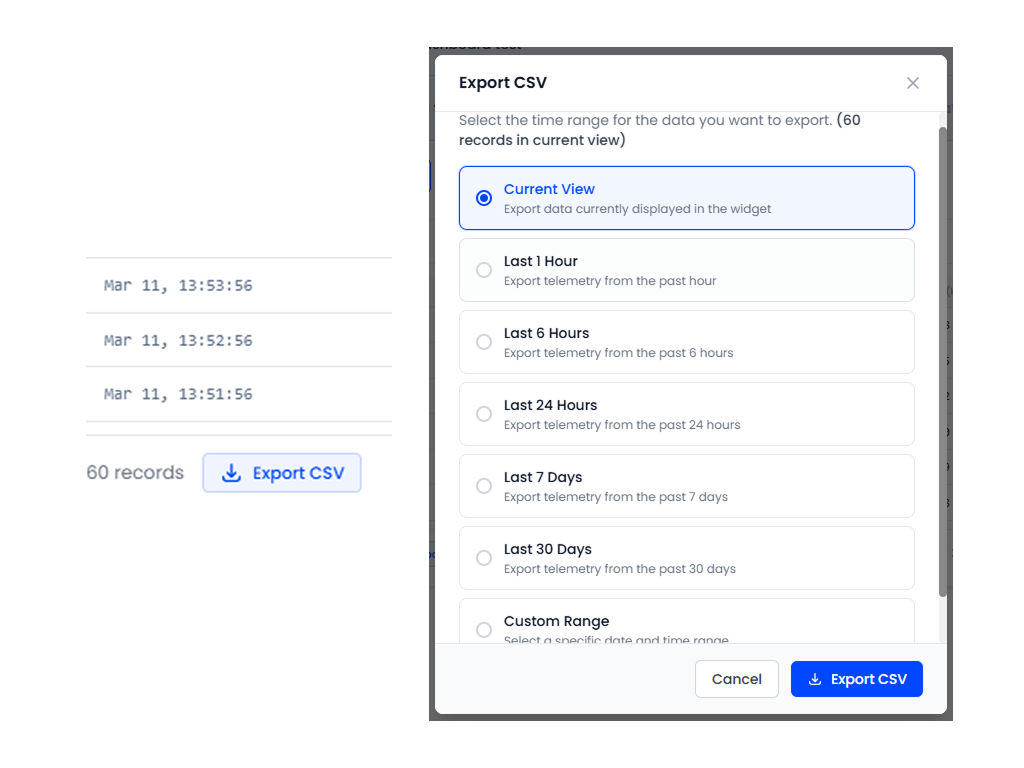
On the Timeseries Table widget, click Export CSV.
In the Export CSV dialog ("Select the time range for the data you want to export."), choose a range:
| Option | Exports |
|---|---|
| Current View | Exactly the rows the widget is showing. The dialog shows how many records |
| Last 1 Hour / Last 6 Hours / Last 24 Hours / Last 7 Days / Last 30 Days | That range, fetched fresh |
| Custom Range | Any From and To you choose |
Confirm. The button shows Exporting…, then your browser downloads the file.
How long ranges are exported
Longer ranges are summarized to the resolution the widget shows: the last reading in each interval, not every sample. Short ranges keep every reading. The dialog shows this note whenever it applies.
This keeps month-long exports small enough to download quickly.
Need every raw reading, for example for an audit? Use the read-only external API. It returns raw readings without summarizing.
File format
| Column | Format |
|---|---|
| Timestamp | ISO 8601 in UTC, for example 2026-09-18T07:30:00.000Z |
| One column per field | The values you selected, using the widget's column labels |
Rows are ordered newest first.
Example
Timestamp,Temperature,Humidity
2026-09-18T07:30:00.000Z,21.4,48
2026-09-18T07:29:00.000Z,21.3,48
2026-09-18T07:28:00.000Z,21.3,49
Timestamps are in UTC. In Excel or Google Sheets, add your time-zone offset to show local time.
Availability
CSV export is a plan feature. If the Export CSV button isn't visible, your plan doesn't include it. Contact your administrator about upgrading.
Use cases
- Compliance reporting: export data for regulatory submissions
- Offline analysis: process data in Excel, Python, or other tools
- Sharing: send data to stakeholders who don't use Sensorclouds
Troubleshooting
| Symptom | Cause | Fix |
|---|---|---|
| There's no Export CSV button | CSV export isn't in your plan, or the widget isn't a Timeseries Table | Use a Timeseries Table widget, or ask your administrator about your plan |
| The file has fewer rows than readings sent | Long ranges are summarized to one reading per interval | Export a shorter range, or use the API for every reading |
| The file is empty or starts later than you asked | No data in that range, or the range reaches past your plan's retention window | Pick a range inside the window that has data |
| Times look a few hours off | Timestamps are in UTC | Add your time-zone offset in your spreadsheet |